Melonity Deadlock Review: Features, Modules and Risks
Hi, everyone. Here is the second piece in my series about cheats for CS2 and Deadlock. The market of software for the new Valve shooter is growing fast, and today we go through one of the products in this niche: Melonity.
Melonity’s Deadlock page presents it as a set of cheats and scripts for the game, with more than 200 functions and hero scripts for different situations. This review sticks to what that page lists and what the menu screenshots show, and it marks every protection claim as the developer’s own.
Want to look at the Deadlock product yourself? Here you go — melonity.gg (clickable link)
Time to open the hood and go through the modules one by one.
1. Aimbot
Shooting and finishing enemies in Deadlock work nothing like they do in traditional shooters, which is why a good cheat has to give you flexible tuning. Melonity describes its Aimbot as high-quality aim assistance.
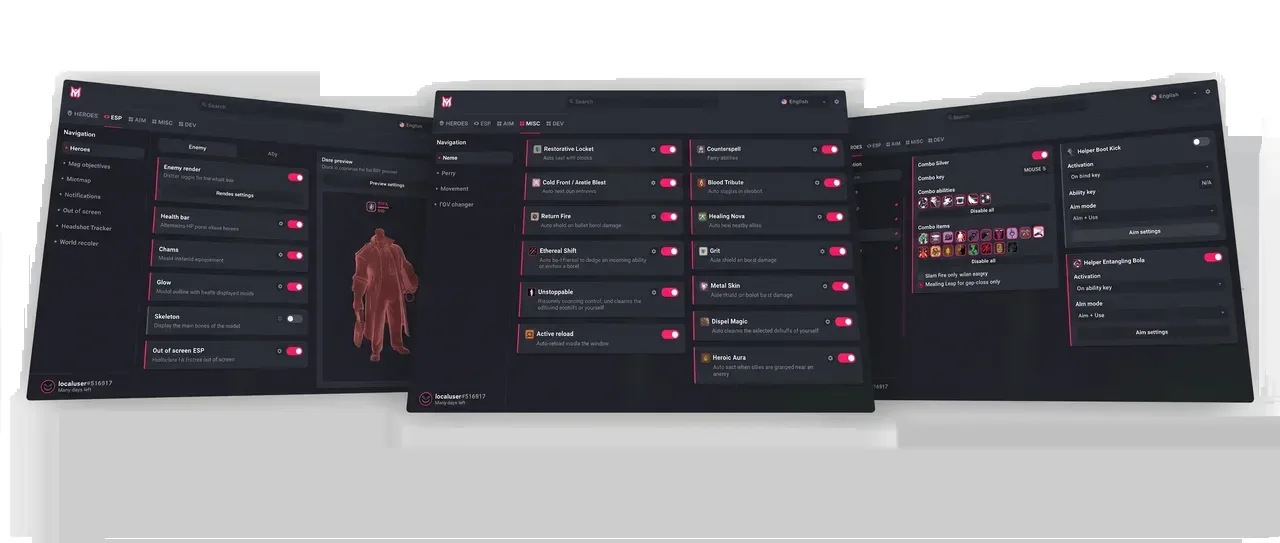
What to look at in the Aim tab:
- Aim behavior: check whether the aim correction is visible on screen or not, and whether it can be set per situation.
- What it aims at: the page does not list target types, so check whether the menu offers players, creeps or orbs before you count on it.
- FOV and smoothing: these two settings decide where the assistance reaches and how soft the movement feels.
2. Visuals (ESP)
In any shooter, a good cheat gives you the fullest possible picture of the map. On its Deadlock page Melonity says its visuals highlight allies and enemies, souls, map activity and power-ups, and let you adjust the FOV.
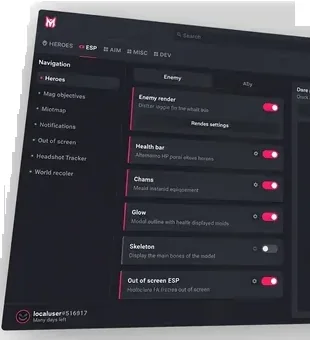
- The basics: an enemy render and the information around it, visible at a glance.
- State of the enemy: a health bar helps you judge in a second whether a gunfight is worth taking.
- Customization: options such as chams and glow change how heroes stand out against the surroundings.
3. Auto parry, Auto items and the Misc tab
The Misc tab collects utility features. Melonity lists two groups that matter for fights.
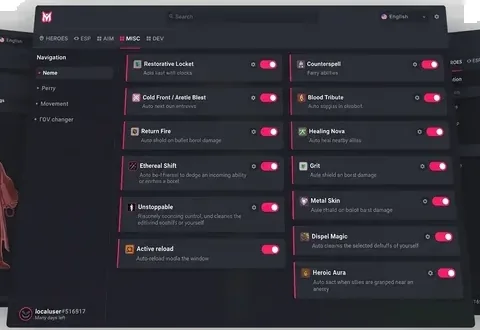
- Auto parry: automatic parrying with customization options. The page describes it as made for legitimate gameplay, but any automation of timing remains something the game’s rules may not allow.
- Auto items: item automation, including an auto-counterspell, auto-dispel and other save items, with deep customization according to the page.
The same Misc tab also has a Movement page. We break down the dated changelog lines for bhop, auto strafe, wall jump, corner jump and mantle slide in our Deadlock movement scripts guide.
4. Protection modules and Humanizer
Melonity groups its protection under the name Melonity Safe and lists three modules: AntiVAC, Spoofer and Humanizer. According to Melonity, Humanizer is “a module responsible for hiding our scripts from patrols and server checks,” and AntiVAC “allows you to remain undetected by VAC anti-cheat.” Those are the developer’s statements, not something I have verified.
Anyone who has read my articles knows this (and if you have not, go check my profile): VAC works as a user-mode anti-cheat, and this one fact is both what makes it good and what holds it back the most. Vanguard and the anti-cheat from Faceit sit in the kernel, whereas VAC does not live there but runs like any other app on your PC. Kernel-level access lets possible third-party cheats reach your private data, and such anti-cheats regularly clash with normal programs and even with other anti-cheats.
Valve has been patching that weak spot by adding neural networks and server-run checks to some titles, and those study the data coming from players in real time. A humanizing module is meant to even out mismatches that such checks could spot, but how well it works is not something a product page can prove. The risk of a ban is never zero, and an account can still be flagged.
Overview
Melonity covers the typical areas of a Deadlock cheat: aim assistance, visuals, auto parry and item automation, with its own set of protection modules. It supports Windows 10 and Windows 11 only. Judge each module in the menu yourself and treat the protection claims as claims. If you are weighing Melonity against another seller, our Melonity vs Umbrella comparison puts the public pages of both side by side.
Pick your cheats with care! If you want to read the module list for yourself, open the official Melonity page for Deadlock.